Your morning, ready before you are.

EarlyWire reads the subjects, news and channels you care about while you sleep, then has it waiting when you wake: Deep Dives on what you follow, the day's news, your own video lists and new music. Open it, finish it, get on with your day.

iPhoneiPadMacNo accountNo adsNo tracking

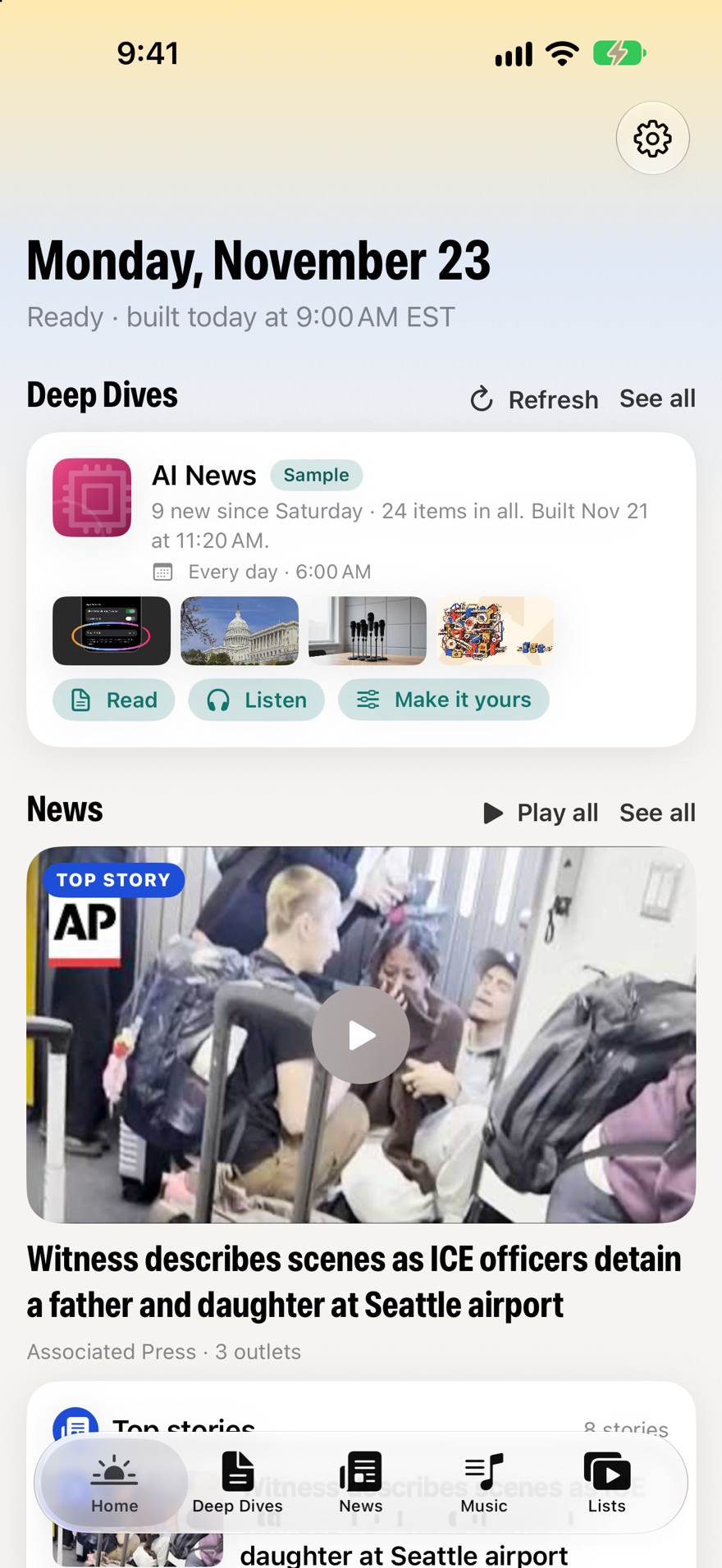
EarlyWire's Home screen: a card for each Deep Dive saying what's new, then the news

Drag the night.
Watch your morning get built.

EarlyWire works while you sleep, so the first thing you do is read or press play, not search.

10:00PM
  1. You go to sleep.Your phone charges. Nothing for you to do.
  2. iOS gives EarlyWire a turn.iOS decides when, usually overnight. If it skips a night, the app catches up the moment you open it.
  3. It reads, picks and writes.Channel feeds, news, your keywords. It chooses by the rules you set, then checks each summary against the source.
  4. Your morning is ready.A quiet notification. Your Deep Dives, the news, your video lists and music are on Home.

Times are an example. iOS chooses when background work runs, so EarlyWire also builds whatever is due when you open it, and says how long ago each part was built.

Compose your morning.

Check what you want and watch Home fill in. In the app you start from the kind of morning you want, or just describe it in a sentence.

Examples only. In the app, everything comes from the subjects, channels and artists you choose.

Friday, October 9

Ready · built today at 6:03 AM

✎︎

AI News

9 new since yesterday
  1. New chip promises faster on-device AI Reuters
  2. Model makers tighten rules on abuse The Verge
  3. A state opens an AI enforcement unit PYMNTS
✉︎

News

10 stories
  1. Senate passes the funding bill CNN
  2. Storm moves up the coast Fox News
  3. Markets open higher Reuters
▶︎

Science Fun

8 videos
  1. Testing the world's strongest magnet Mark Rober
  2. Why randomness isn't random Veritasium
  3. The edge of the solar system Kurzgesagt
♫

Music

12 songs
  1. A new single An artist you follow
  2. A new video A country artist
  3. A new release A pop artist
Total9 new items

Nine things that add up to a better morning.

1

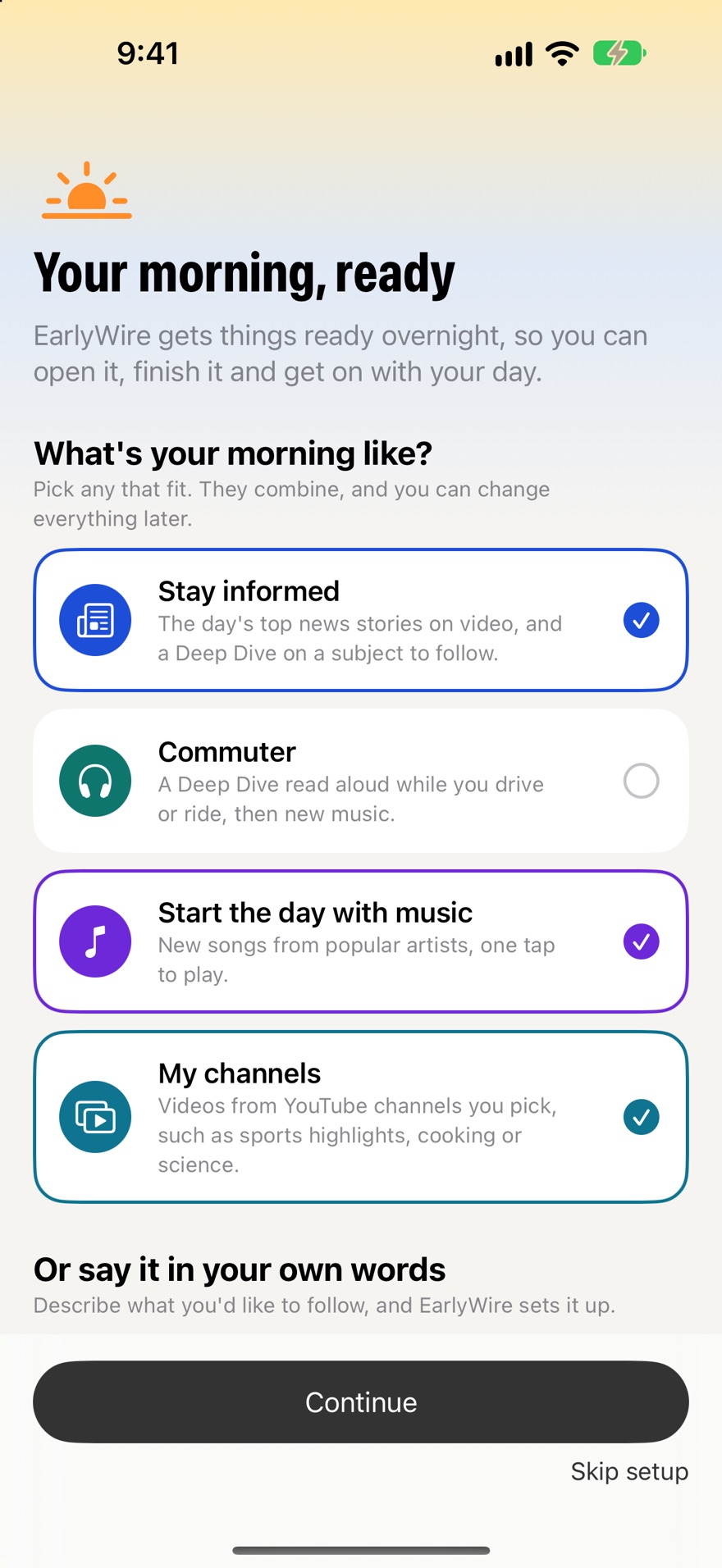
Say what kind of morning you want.

Pick what fits: Stay informed, Commuter, Start the day with music, or My channels. They combine. Or describe your morning in a sentence and EarlyWire sets it up. Then it builds your first morning while you watch.

  • Change anything later, one setting at a time or in a sentence.
  • No account, and nothing to sign in to.
EarlyWire's first screen: four kinds of morning to pick from, or describe your own
2

One morning, top to bottom, with an end.

Home starts with your Deep Dives, each saying what's new since the last issue. Then the news, your video lists and music. At the bottom it says "That's your morning," so you know you're done.

  • Pull down to refresh the news, video lists and music.
  • Tap Play all and a whole list opens in the YouTube app, with your own account.
Home: a card for each Deep Dive with what's new, then the news
3

Follow a subject in depth.

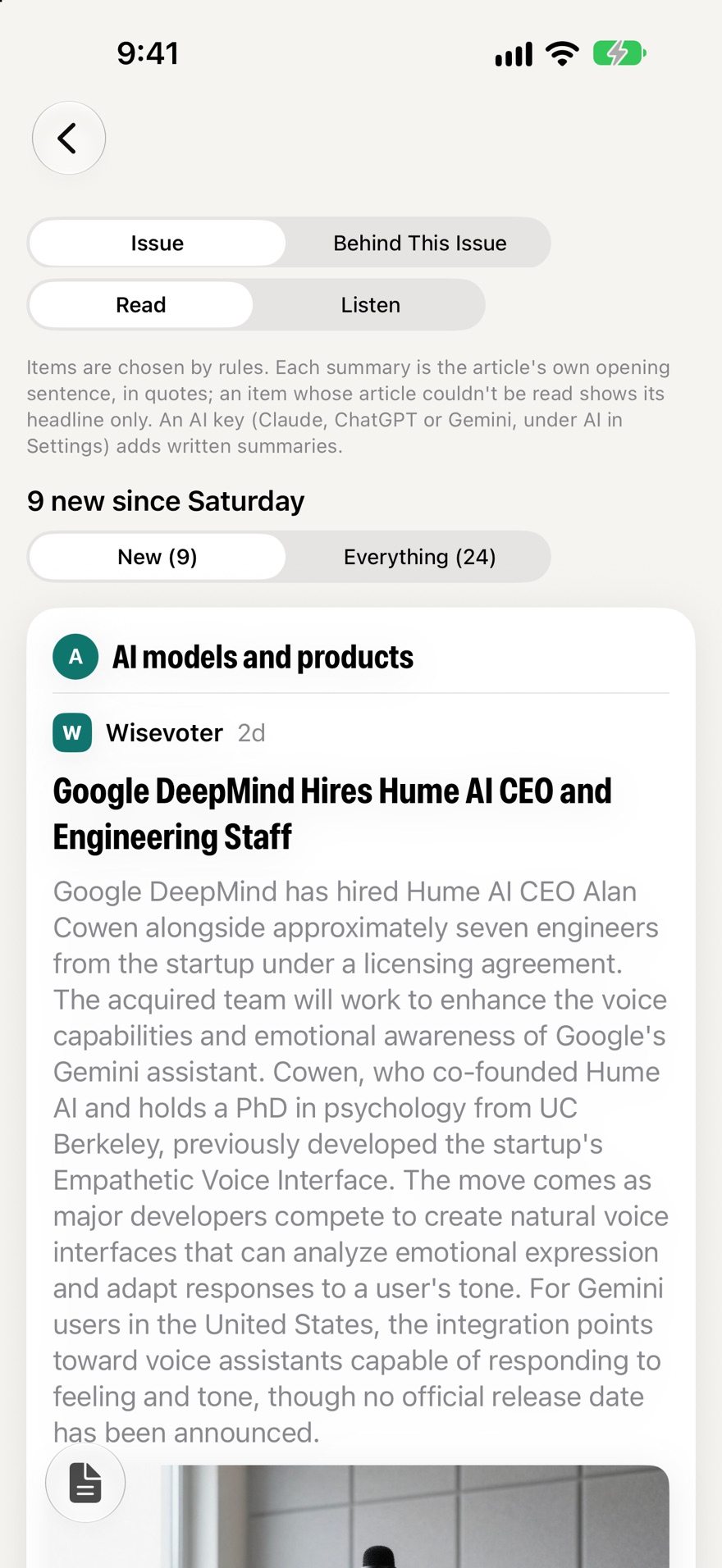
A company, a competitor, a hobby, a field of research. Give a Deep Dive its topics and EarlyWire gathers the news, groups the repeats and lays each story out with its outlet, headline, summary and picture. Each issue leads with what's new since the last one, not the same pile again.

  • Scan, Brief or Deep: headlines only, a short summary, or a longer read.
  • As many Deep Dives as you like, each with its own name and schedule.
A Deep Dive's page: 9 new since Saturday, with a switch between New and Everything
4

More on any one story, from its sources.

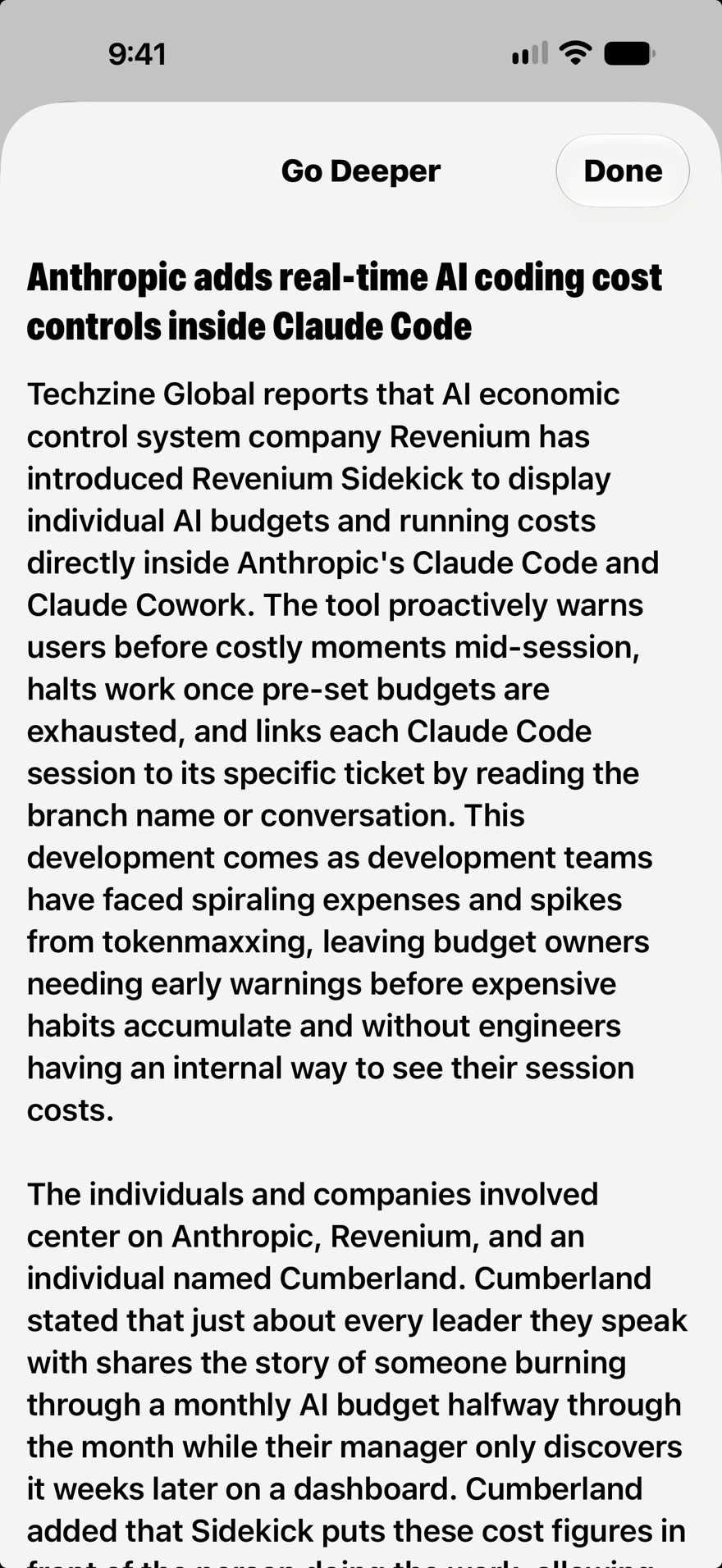
Tap Go deeper on an item and EarlyWire reads the article and other outlets covering it, then explains the story at more length: what happened, the background, who is involved and what comes next. It names the outlet for what only one reported, and says what the sources don't cover.

  • With your own AI key it writes one explanation. Without one it shows more of the articles' own words.
  • The sources are always listed, one tap away.
Go deeper: an explanation of one story written with an AI key, naming the outlet it draws on
5

Once a week, what it all added up to.

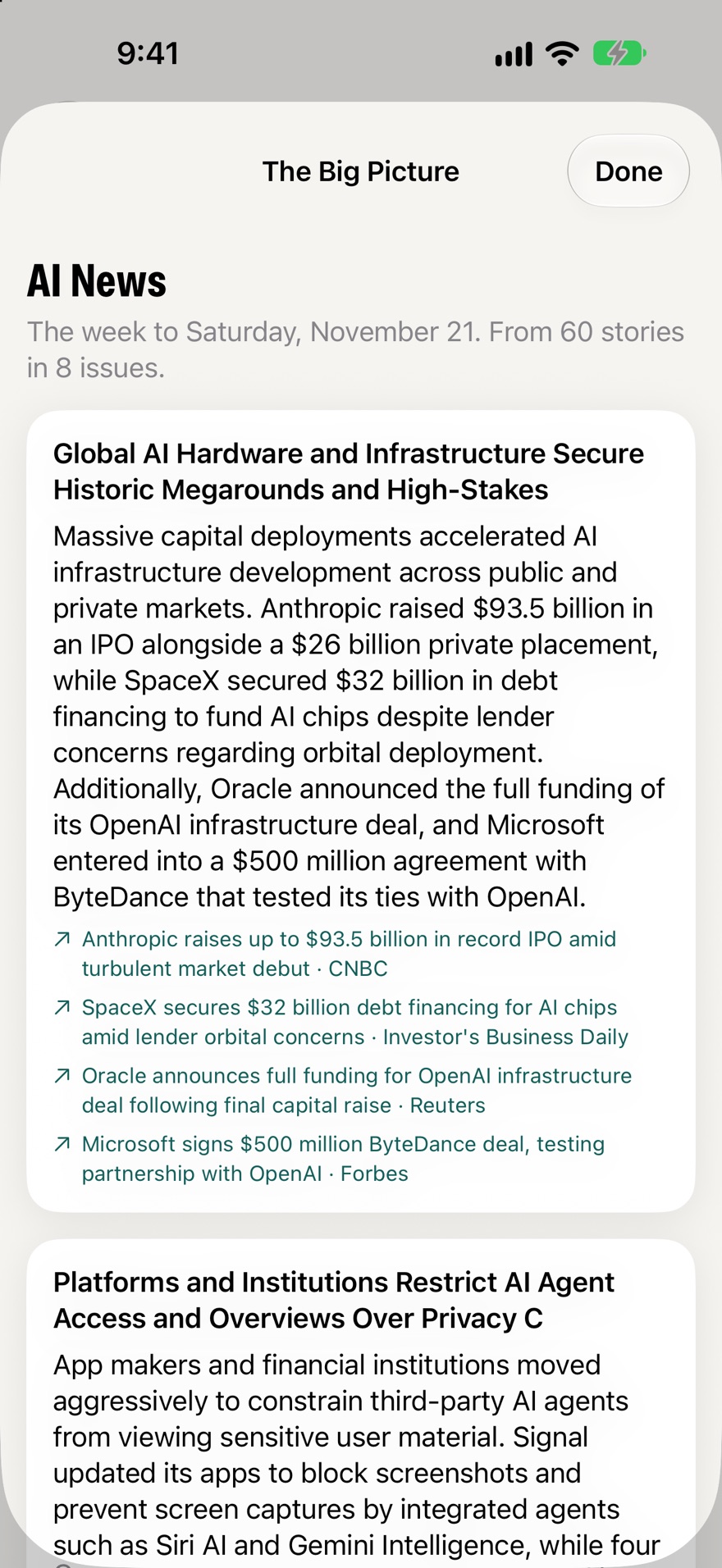
For a subject you follow every day, turn on the weekly big picture. On the day you choose, EarlyWire pulls the week's issues into a few themes, each linked back to the stories behind it.

  • Written from issues already built, so nothing is searched again.
  • Without an AI key it lists each topic's main stories of the week.
The Big Picture: this week's themes for AI News, each with its stories
6

Every issue, kept.

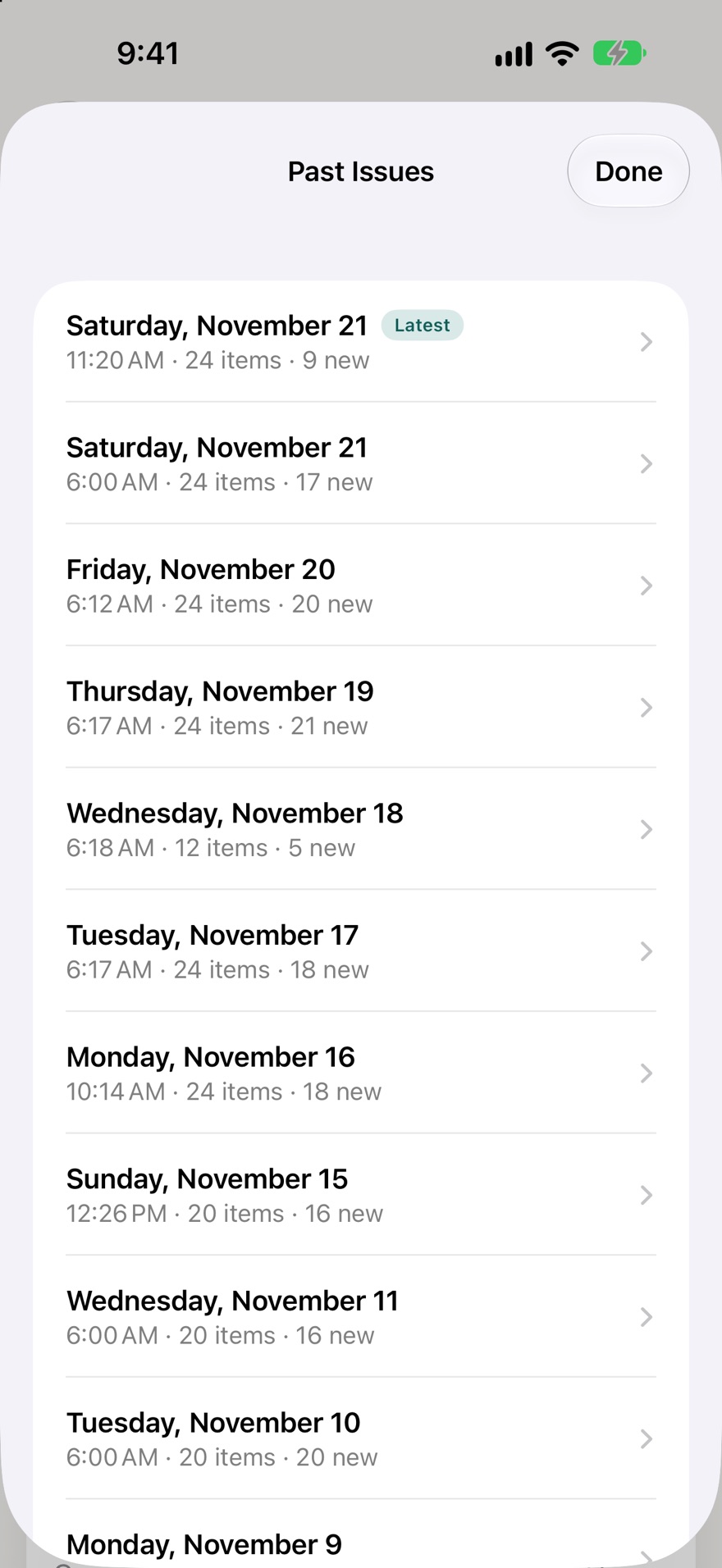
Each Deep Dive keeps its past issues on your device, with what each one added. Go back to last Tuesday in two taps.

  • The newest 52 issues are kept for each Deep Dive.
Past Issues: a list of dated issues, each with how many items were new
7

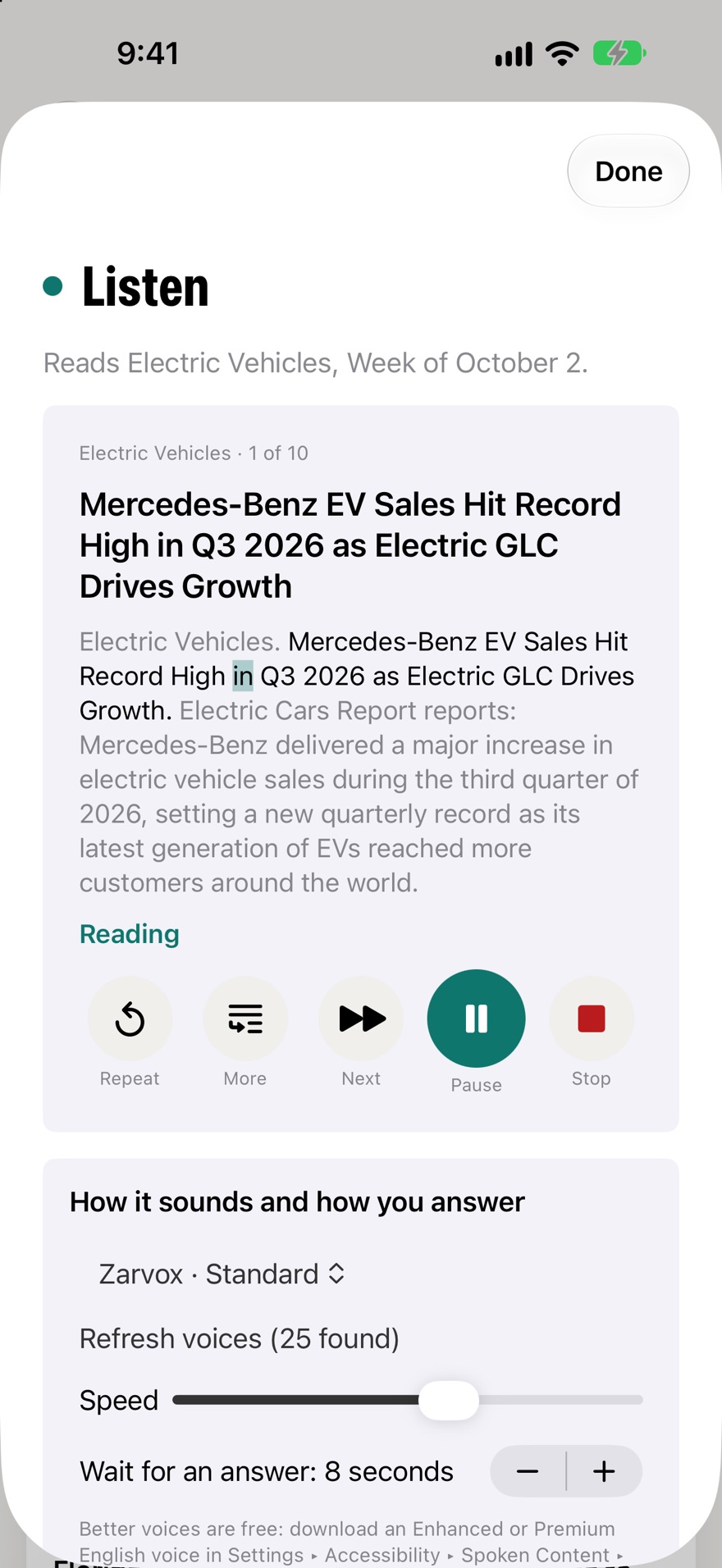
Have it read to you. Hands free.

Switch a Deep Dive from Read to Listen and it reads what's new. Say or press More, Next or Repeat from your headphones, your lock screen or your voice.

  • Start it with Siri: "Listen to my Deep Dives in EarlyWire."
  • A Lock Screen and Control Center control starts it too.
The Listen player reading an item with the spoken word highlighted
8

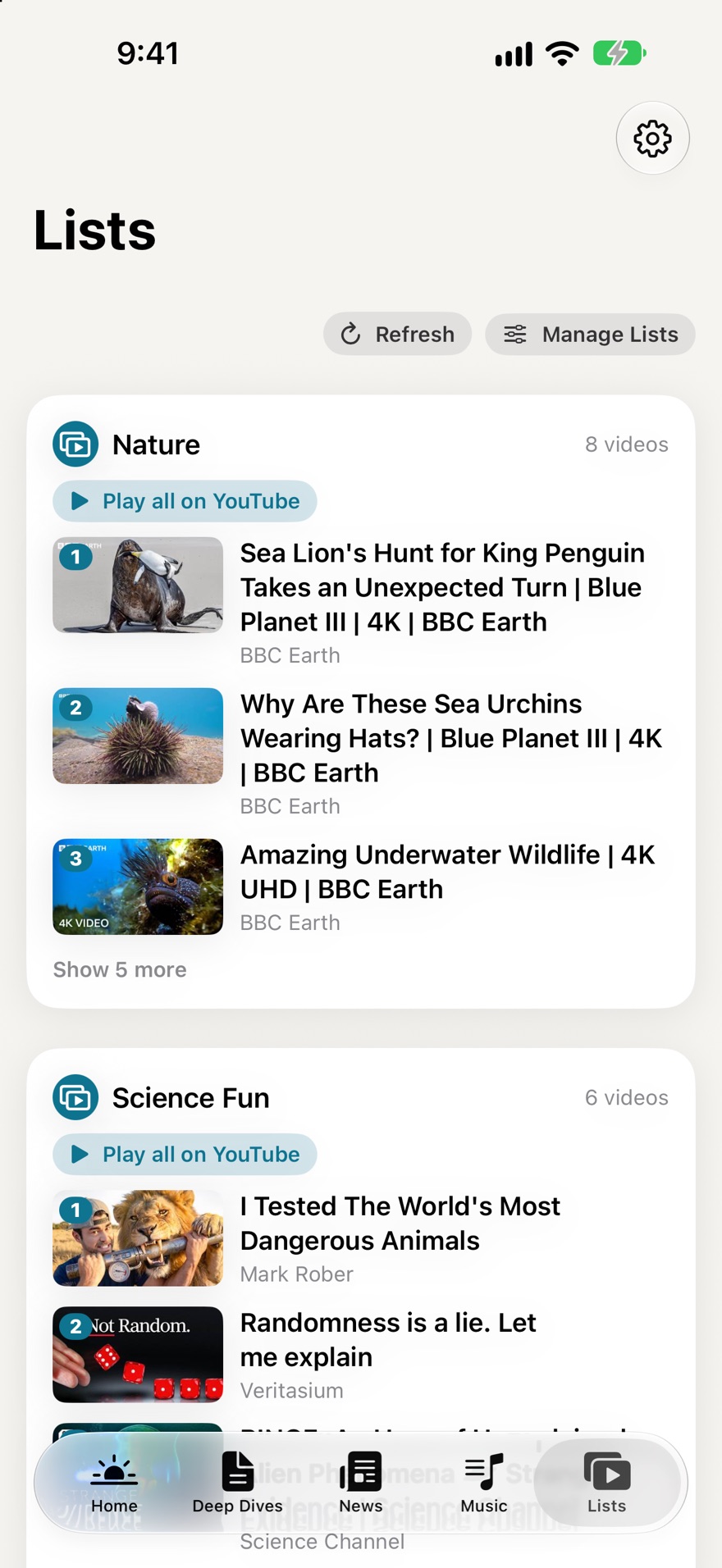
Your own rows of videos.

Pick channels you like, follow a YouTube playlist, or start from an idea such as Science Fun, Cooking, Hero Animals or Sports Highlights. Each list becomes a row on Home, with the newest videos each morning.

  • Set a time limit on any list, such as "stop at 15 minutes."
  • News and music work the same way: the day's top stories from the outlets you choose, and new songs from your artists.
The Lists tab: Nature and Science Fun, each with Play all on YouTube
9

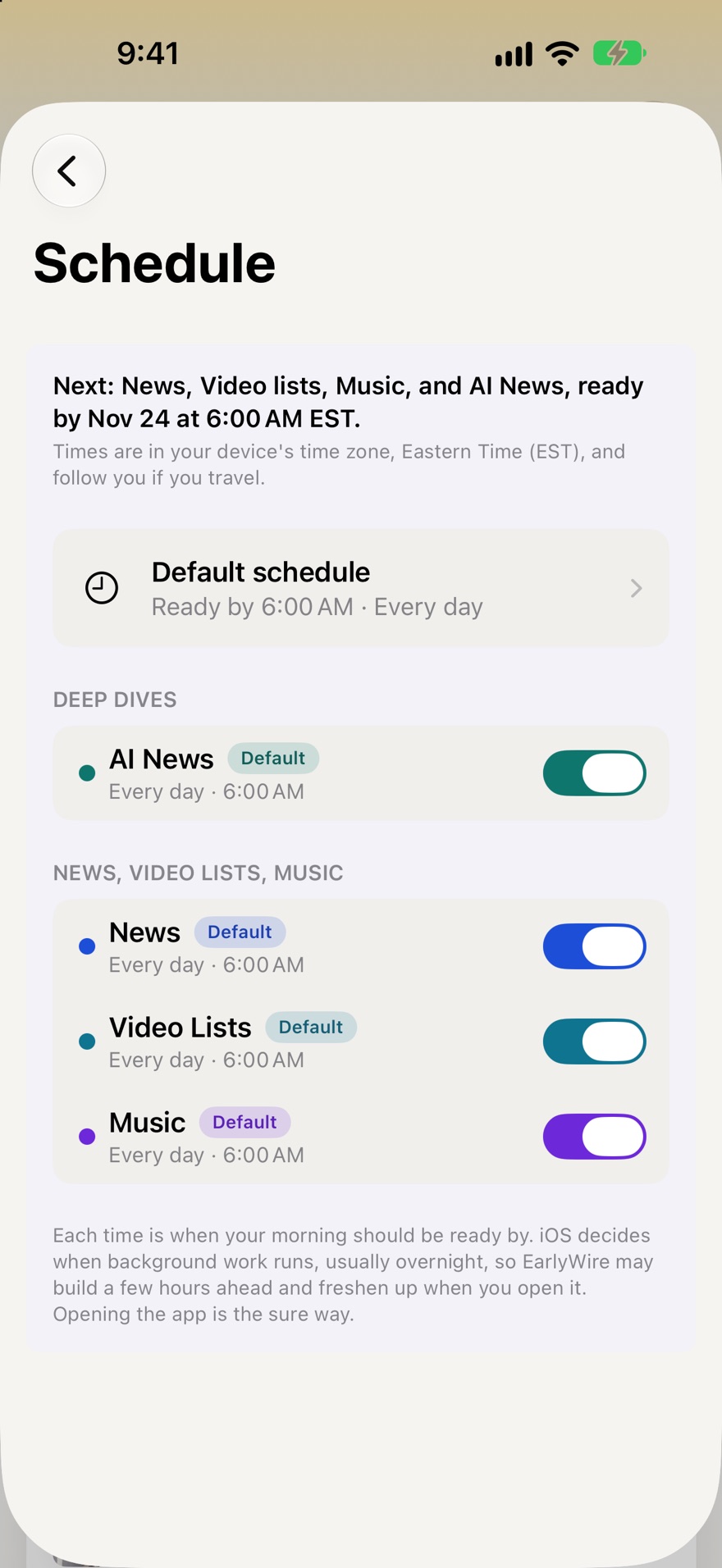
Say when it should be ready.

Pick a "Ready by" time and the days, once, and everything follows it. Give any Deep Dive or your video lists their own time when they need one. Ready means ready by then, even if iOS builds a few hours earlier.

  • Every day, weekdays, every other week or once a month.
  • Home Screen and Lock Screen widgets show what was built and when the next build is due.
The Schedule list: a default schedule and a row for each part of the morning

One app, a lot of different mornings.

These are ideas for how people could set it up. Each takes a few taps, or a sentence.

The founder

What your competitors did overnight.

A Deep Dive on three competitors, with big events flagged at the top. Each morning shows only what's new since yesterday.

"4 new since yesterday": read those, skip the rest
The week's big picture, in five themes
Deep DiveWhat's newWeekly big picture
The commuter

Your subject, read to you on the way in.

A Deep Dive you can listen to hands free in the car or on the train, then new music for the rest of the ride.

"Hey Siri, listen to my Deep Dives in EarlyWire"
Say "More" on the ones that matter, "Next" on the rest
CommuterListenSiri
The fan

Last night's highlights, without the hunting.

A video list of the leagues' own channels, capped at 15 minutes, next to lists for whatever else you watch.

Sports Highlights: the newest from the NFL, NBA and MLB
Tap Play all, watch while you get ready
My channelsSports HighlightsStop at 15 minutes
The music hunter

New songs from the artists you actually like.

Start with popular artists or a genre pack, then add your favorites. Their newest songs come first.

Twelve new songs, newest first
Play all on the drive to work
Start the day with musicArtistsGenre packs
The home cook

A Deep Dive called "Dinner Ideas."

Name a Deep Dive anything. Add keywords like slow cooker, sheet pan or air fryer, and get a fresh list each week.

A weekly issue of new recipes and techniques
Pick three for the week, done
Custom nameKeywordsEvery week
The curious

A slow trickle on one subject.

Follow a hobby, a city, a new technology or a long-running story once a month, without another feed to check.

A monthly issue on the topic, set to Scan
Read what changed, ignore the noise
MonthlyDescribe it in a sentence

These are illustrative setups, not customer stories.

iPhone, iPad and Mac. The same morning on each.

Your settings and latest builds follow you through iCloud, so each device has the same Deep Dives, channels and schedules, and shows what the other already built.

Home on iPhone
Home
A Deep Dive on iPhone
A Deep Dive
Go deeper on iPhone
Go deeper
The Big Picture on iPhone
The big picture
Past Issues on iPhone
Past issues
Video lists on iPhone
Video lists
First run on iPhone
Set up

There is no EarlyWire server to trust.

The app does the work on your device. We never see your subjects, your channels or what you ask.

  • No account.Open it and start. There is nothing to sign up for.
  • No ads, no analytics, no tracking.Nothing in the app reports back to us.
  • Your data stays on your device.Settings, issues and keys live in the app's private storage and your Keychain. With iCloud on, your settings and latest builds also sync between your own devices through Apple's iCloud, never through us.
  • AI that stays on your device by default.Apple's on-device model helps set things up, and nothing in the everyday app asks you to pick an AI. Claude, ChatGPT or Gemini is optional, with your own key, and only when you use it. Step-by-step guides make the key in a few minutes. Keys stay on your device.
Your device settings · issues · keys YouTubepublic channel info News sitesarticles and feeds Your AIonly with your key EarlyWirereceives nothing dashed: optional or never
 EarlyWireTypical news and playlist apps
Account requiredNoUsually
A server holding your reading habitsNoneYes
Ads and trackingNoneCommon
You choose the sources and the rulesYes, every oneRarely
Shows where each summary came fromAlways, with a linkVaries

Read the full privacy policy. Comparison is of design choices, not of any named product.

Early days.

Be one of the first voices.

EarlyWire is in private testing with a small group. Their words will appear here, with their permission, once they have lived with it for a while. If you try it, tell us what you think.

Share your thoughts

Straight answers.

What does it cost?

EarlyWire is free to try for 7 days. After that, a single one-time purchase of $4.99 keeps it on your iPhone, iPad and Mac. No subscription, and nothing renews. If you choose to add your own Claude key, Anthropic bills that usage to your own account; that is optional.

Do I need an account?

No. There is no EarlyWire account. You only sign in to Google if you turn on emailing a Deep Dive's issue to yourself or your team, and then only to send mail you asked for.

Does it download or copy YouTube videos?

No. It reads public information about videos and channels to choose what to show. When you tap Play all, the list opens in the YouTube app or on youtube.com, with your own account and any Premium benefits you have.

Do my iPhone and Mac share settings?

Yes. When you are signed in to the same iCloud account, your Deep Dives, channels, rules and schedules stay the same on every device, and so do the latest builds, so a device that sees one doesn't build it again. It all goes through Apple's iCloud and not through us. Each device keeps its own Google sign-in. Your Claude key stays on the device unless you choose "Use this key on all my devices" under AI, which shares it through iCloud Keychain, encrypted end to end by Apple. You can turn syncing off in Settings.

When does it build my morning?

iOS decides when background work runs, which is usually overnight while your device charges. Whatever is due is also built the moment you open the app, and each part shows when it was last built. On a Mac it builds on schedule while the app is open or at login.

Do I need Apple Intelligence or an AI key?

No. Without either, EarlyWire picks and groups stories by rules, and shows the article's own first sentence under each headline. Apple's on-device model, on devices that have it, helps with setup. Claude, ChatGPT or Gemini, with your own key, improves choices, summaries and suggestions. Gemini is free to start.

Can I trust the summaries?

Every item names its outlet and links to the original. Without an AI key, each item shows the article's own opening sentence rather than a rewrite. With your own Claude, ChatGPT or Gemini key, the AI writes the summaries and is told to use only what the sources say; Go deeper and the weekly big picture say who wrote them and list their sources. An AI can still get things wrong, so the articles are the record.

Which devices does it run on?

iPhone and iPad with iOS or iPadOS 26.1 or later, and Mac with macOS 26 or later.

Is EarlyWire affiliated with YouTube, Google, Anthropic or OpenAI?

No. It is an independent app. YouTube, Google, Gemini, Claude and ChatGPT are trademarks of their owners.
EarlyWire app icon: a sunrise over a sound wave

Wake up to your morning, already made.

EarlyWire is coming to the App Store for iPhone, iPad and Mac. Tell us you're interested and we'll send you a note the day it's ready.

This opens an email to support@sms-apps.com. We use your address only to reply.